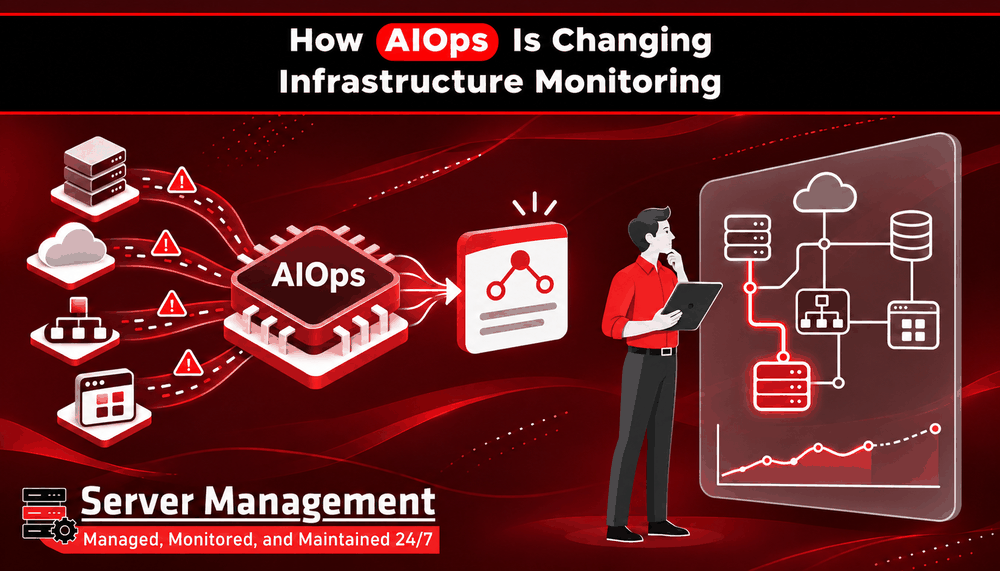
How AIOps Is Changing Infrastructure Monitoring
Modern businesses depend on servers, networks, cloud platforms and applications to keep their daily operations running. Even a small technical issue can affect website performance, interrupt online services or prevent employees from accessing important systems. Traditional infrastructure monitoring helps IT teams identify these problems by tracking server resources, network activity and system performance. However, as IT environments become more complex, checking large amounts of monitoring data and responding to every alert can become difficult.
This is where AIOps comes in. By combining artificial intelligence with IT operations, AIOps is changing how businesses monitor, understand and manage their infrastructure.
What Is AIOps?
AIOps stands for Artificial Intelligence for IT Operations. It uses artificial intelligence, machine learning and data analysis to improve the way IT systems are monitored and managed. Instead of depending only on fixed monitoring rules, AIOps analyses information collected from servers, applications, networks and other infrastructure components. It identifies patterns, detects unusual activity and helps IT teams understand possible problems.
For example, if a server normally uses a certain amount of memory during business hours, an AIOps platform can learn this pattern. If memory usage suddenly increases beyond its usual behaviour, it can identify the change and notify the IT team.
How AIOps Improves Infrastructure Monitoring
AIOps brings several improvements to traditional monitoring methods.
1. Detecting Problems Earlier
Traditional monitoring tools often depend on predefined limits. For example, an alert may be triggered when CPU usage reaches a specific percentage. AIOps can analyse historical and real-time performance data to identify unusual changes, even when they do not cross a fixed limit. This helps IT teams notice potential problems earlier and investigate them before they cause major service interruptions.
2. Reducing Unnecessary Alerts
A single infrastructure problem can generate several alerts from different monitoring systems. This can make it difficult for IT teams to identify which notification needs immediate attention. AIOps can analyse related alerts, group similar events and identify which ones may be connected to the same issue. This reduces repeated notifications and helps teams focus on important problems.
3. Identifying the Possible Root Cause
When a website becomes slow, the reason may not be immediately clear. It could be related to high CPU usage, memory limitations, database performance, network delays or an application issue. AIOps can compare information from different infrastructure components to identify relationships between events. This helps technical teams narrow down the possible cause instead of investigating every system separately.
4. Predicting Infrastructure Requirements
Infrastructure needs can change as a business grows. More website visitors, larger databases and additional applications can increase server resource usage. By analysing historical usage and performance trends, AIOps can help identify possible future resource requirements. IT teams can use these insights to plan upgrades, manage capacity and prepare for expected increases in workload.
5. Supporting Faster Responses
AIOps can help technical teams respond to common infrastructure problems more efficiently. Depending on the tools and automation rules in place, it may send notifications, create support tickets or trigger predefined actions.
For example, a monitoring system could automatically notify the responsible team when a critical service stops responding. For known issues, an approved automation workflow may restart a service or perform another corrective action. However, automated actions should be carefully configured and monitored to avoid unexpected changes.
AIOps vs Traditional Infrastructure Monitoring
Both approaches help IT teams understand infrastructure performance, but they work differently.
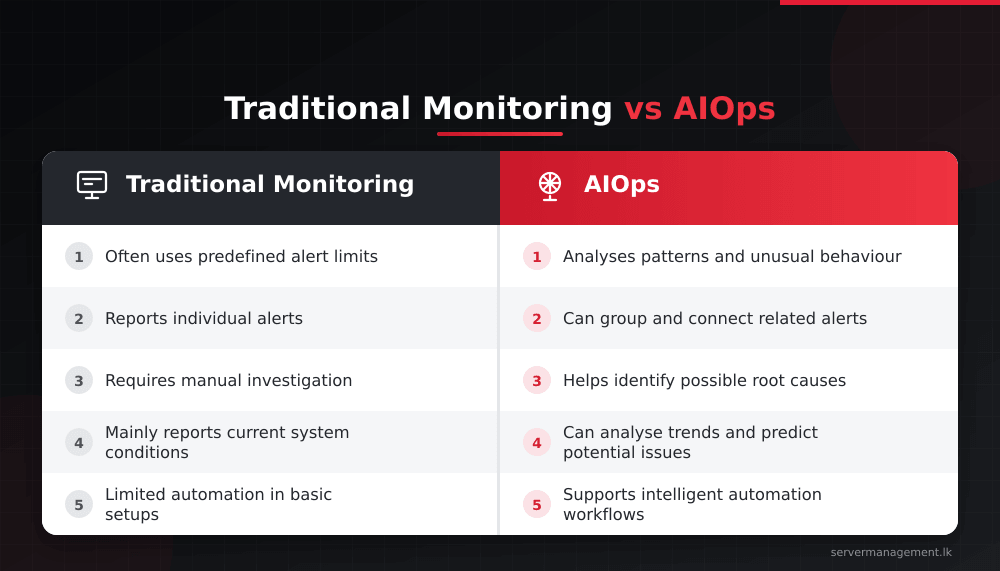
Traditional monitoring is still important. AIOps builds on monitoring data and adds more advanced analysis and automation capabilities.
Does AIOps Replace Server Administrators?
No. AIOps supports technical teams but does not remove the need for experienced server administrators. AI-powered tools can identify unusual activity, highlight possible causes and automate selected tasks. However, technical knowledge is still required to understand the situation, check the recommendations and make the right decisions.
For example, an alert about high server resource usage may require checking application behaviour, database queries, traffic patterns or server configuration. An experienced administrator can investigate these factors and decide on the appropriate solution. The best results come from combining intelligent monitoring tools with proper server management and technical expertise.
Why Infrastructure Monitoring Still Matters for Businesses
As businesses depend more on digital services, infrastructure monitoring becomes an important part of maintaining reliable operations. Regular monitoring helps identify resource limitations, service failures, unusual activity and performance changes.
AIOps adds another level of analysis by helping teams understand monitoring data and respond more effectively. However, businesses still need suitable monitoring systems, regular maintenance, security updates and proper server management practices.
Improve Your Infrastructure Management with ServerManagement.lk
Managing servers requires more than checking whether they are online. Businesses need to monitor performance, maintain security, identify technical issues and ensure that their infrastructure can support daily operations.
ServerManagement.lk provides server management services to help businesses maintain and manage their server environments. With technical support for server monitoring, configuration, security and maintenance, businesses can get assistance with their ongoing infrastructure requirements.
Looking for professional server management support? Visit ServerManagement.lk to explore the available services and get help managing your server infrastructure.

